Introduction
Artificial intelligence has quickly become one of the most useful technologies in modern life. From writing emails and creating images to organizing business tasks and learning new skills, AI tools are changing how people approach their daily responsibilities. Tasks that once required hours of work can now sometimes be completed in minutes with the help of intelligent software.
Today, AI is no longer limited to programmers, researchers, or large technology companies. Students use AI assistants to understand difficult subjects, professionals use them to organize information, and small business owners use them to create content and improve customer service. Even people with little technical experience can benefit from many AI-powered applications.
The growing popularity of these tools reflects a wider change in how people interact with technology. Instead of simply using software to perform individual tasks, users can now communicate with AI systems, provide instructions, and receive personalized assistance.
However, not every AI tool is suitable for every purpose. Some are designed for writing, others specialize in research, image creation, coding, or productivity. Understanding their strengths and limitations can help people choose the right tools for their needs.
In this article, we explore some of the leading AI tools transforming work and everyday life, how they are used, and what their growing popularity means for the future.
1. ChatGPT: An Everyday AI Assistant
ChatGPT is one of the best-known AI assistants and is used for a wide range of personal, educational, and professional tasks. It allows users to ask questions, explore ideas, draft content, summarize information, and work through problems using natural language.
For students, ChatGPT can explain complicated topics in simpler terms, generate practice questions, and help organize study plans. Professionals can use it to prepare emails, outline reports, brainstorm projects, and improve written communication.
Small business owners may find it useful for developing marketing ideas, drafting product descriptions, preparing frequently asked questions, and planning social media content. Depending on the features available, users can also work with documents, images, and other forms of information.
One of its main advantages is flexibility. Rather than learning a separate application for every task, users can describe what they want to accomplish and refine the results through follow-up instructions.
However, ChatGPT can sometimes produce incorrect information or misunderstand a question. Important facts should be verified, particularly when dealing with health, finance, legal matters, or other sensitive subjects.
Used thoughtfully, ChatGPT can serve as a practical assistant that helps people save time, develop ideas, and approach everyday challenges more efficiently.
2. Google Gemini: AI for Research and Productivity
Google Gemini is another widely used AI assistant. It can help users answer questions, summarize information, develop ideas, and work with different types of content.
One advantage of Gemini is its connection with Google’s broader technology ecosystem. Depending on the account, region, and available subscription, supported integrations can help users work with services such as Gmail, Google Docs, and Google Drive.
For example, a professional may use AI to help organize information before preparing a report. A student might use it to understand a topic or create a study outline. Someone planning a trip could ask for suggestions and then verify details such as opening hours, prices, and transportation options.
Gemini also supports multimodal interactions, allowing compatible versions to work with information such as text, images, and audio.
These capabilities can make research and productivity tasks more convenient. However, users should distinguish between an AI-generated explanation and information verified through reliable sources.
It is also important to check which integrations are available rather than assuming every feature works with every account.
For people already using Google’s digital services, Gemini can be a useful option for combining AI assistance with familiar productivity tools.
3. Microsoft Copilot: Making Office Work Easier
Microsoft Copilot brings AI assistance into Microsoft’s software ecosystem. Depending on the product and subscription, it can help users draft documents, summarize information, prepare presentations, and work with spreadsheets.
For office professionals, these features can reduce the time spent on routine tasks. A user might request an outline for a business proposal, summarize a long document, or ask for help organizing information in a spreadsheet.
Copilot can also support meeting preparation and communication in compatible Microsoft 365 applications. In supported environments, it may help users summarize discussions and identify important action items.
Businesses can benefit from these capabilities when employees regularly work with documents, presentations, email, and shared files.
Nevertheless, AI-generated work still needs review. A spreadsheet formula should be checked, a presentation should reflect the correct information, and a business document should be reviewed for accuracy and tone.
Availability also varies depending on the product, organization settings, and subscription plan.
Microsoft Copilot demonstrates how AI can become part of familiar software rather than requiring users to move between separate applications. For organizations that already depend on Microsoft products, this integration can make everyday work more convenient.
4. Claude: A Useful Tool for Writing and Document Analysis
Claude, developed by Anthropic, is an AI assistant used for writing, reasoning, coding, and working with documents.
Many users turn to Claude when they need help analyzing lengthy text, organizing complex information, or developing a structured piece of writing. It can assist with drafting articles, summarizing reports, explaining concepts, and reviewing code.
For example, a researcher might use it to summarize a long document before examining the original in detail. A business professional could ask it to organize notes into a clearer report, while a writer might use it to explore alternative structures for an article.
Claude can also assist with programming and technical explanations. Developers may use it to understand unfamiliar code, investigate possible errors, or explore different approaches to a problem.
As with other AI assistants, its results are not automatically reliable. Users should verify important claims, protect confidential information, and test any generated code before using it in production.
The choice between Claude and other AI assistants often depends on the specific task, personal preferences, available features, and budget.
For people who regularly work with documents, writing, and complex questions, Claude is one option worth exploring.
5. Perplexity AI: Helping Users Research Information
Research is another area where artificial intelligence is making a noticeable difference. Perplexity AI is designed to help users explore questions and discover information from online sources.
Instead of returning only a traditional list of search results, it provides conversational answers and, in many cases, citations that point to supporting material.
This can be helpful when researching technology trends, comparing products, learning about a new subject, or gathering background information for an article.
For example, a student might ask for an overview of renewable energy technologies. A professional could investigate developments in a particular industry before preparing a report.
However, citations should not be treated as a guarantee of accuracy. Sources may be incomplete, outdated, or less relevant than they first appear. Users should open the original material and confirm that it actually supports the claims being made.
Research involving current events, prices, regulations, or medical information requires particular care because information can change quickly.
Perplexity can make the early stages of research faster, but good research still requires judgment, source evaluation, and careful fact-checking.
6. Grammarly: Improving Everyday Writing
Clear communication is important in education, business, and everyday life. Grammarly uses AI-powered features to help people improve grammar, spelling, clarity, and tone.
The tool can identify common writing mistakes and suggest changes that make sentences easier to understand. Depending on the product and subscription, it may also help users rewrite passages, adjust the tone of a message, or generate ideas.
Students can use Grammarly to review assignments, while professionals may use it to improve emails, proposals, and reports. It can also be useful for people writing in a second language.
For example, a person preparing a formal email might use its suggestions to make the message more professional. Someone writing a long article may use it to identify awkward sentences and repeated words.
However, automatically accepting every suggestion is not always a good idea. A grammatical sentence can still be misleading, and an overly polished rewrite may remove the writer’s individual voice.
Users should also understand the privacy settings of any writing assistant, particularly when working with confidential business documents.
Grammarly illustrates how AI can improve a specific part of everyday work without requiring users to completely change their existing writing habits.
7. Canva AI: Making Design More Accessible
Creating professional-looking graphics once required specialized design skills and expensive software. AI-powered design features are making some of these tasks easier for beginners and experienced creators alike.
Canva offers tools for creating presentations, social media graphics, posters, marketing materials, and other visual content. Its AI features can assist with generating design ideas, producing visual elements, and adapting layouts.
Small business owners can use these tools to prepare promotional graphics, while teachers may create classroom materials and students can develop presentation slides.
Content creators can also experiment with different visual styles without starting every design from scratch.
These features can save time, but attractive design still requires thoughtful decisions about layout, readability, color, and the intended audience. AI-generated visuals may also contain mistakes or unexpected details that need correction.
Users should check the licensing terms for assets and understand the rules governing commercial use of generated content.
Canva AI is a useful example of how intelligent software can make creative tools more accessible to people who do not have professional design experience.
8. Midjourney and AI Image Generation
AI image-generation tools have opened new possibilities for artists, designers, marketers, and content creators. Midjourney is one of the best-known tools in this category.
Users can describe a visual idea and generate images based on their instructions. They may request a particular atmosphere, artistic style, composition, or color palette.
For example, a designer could explore concepts for a fictional product campaign, while a blogger might develop visual ideas for an article. Artists can also use generated images to experiment with compositions before producing a final piece.
AI image generation can make early-stage creative exploration faster and help people visualize ideas that would otherwise be difficult to communicate.
However, generated images can contain distorted details, inconsistent objects, or other errors. They may also raise questions about copyright, consent, and the use of artistic styles.
Businesses should review applicable licensing terms before using generated images commercially. They should also ensure that visuals are not misleading when used in advertising or news-related content.
These tools are most effective when used as part of a creative process that includes human direction, editing, and careful evaluation.
9. GitHub Copilot: Supporting Software Developers
Software development is another field being transformed by AI. GitHub Copilot is designed to assist programmers by suggesting code, explaining functions, and helping them work through common development tasks.
Developers can use it to generate initial code, write tests, understand unfamiliar programming patterns, and explore possible solutions to technical problems.
For beginners, AI coding assistants can make it easier to understand programming concepts and learn how different parts of an application work. Experienced developers may use them to speed up routine tasks and focus more attention on architecture and problem-solving.
However, AI-generated code can contain errors, inefficient logic, or security vulnerabilities. Developers must review suggestions, test applications, and ensure that generated code follows the project’s requirements.
AI tools also do not eliminate the need to understand programming fundamentals. Without that knowledge, it can be difficult to recognize when a suggested solution is incorrect.
GitHub Copilot shows how AI can function as a collaborative assistant, helping developers write and understand code while leaving responsibility for the final software with the human developer.
10. Notion AI: Organizing Work and Information
Managing information is a common challenge for students, professionals, and businesses. Notes, meeting summaries, project plans, and research documents can quickly become difficult to organize.
Notion combines note-taking, document creation, project management, and collaborative workspaces. Its AI features can help users summarize notes, draft content, extract action items, and organize information.
For example, a team can use AI to turn meeting notes into a list of tasks. A student might summarize research notes before preparing an assignment, while a freelancer could organize project information in a shared workspace.
These features can reduce the time spent searching through documents and preparing routine summaries.
However, summaries can leave out important details, so users should review the original material when accuracy matters. Teams should also consider access permissions and data protection before placing confidential information in any online workspace.
Notion AI can be especially useful for people who already organize their work in Notion and want to make those existing workflows more efficient.
11. How AI Tools Are Transforming Small Businesses
AI tools are not only useful for individuals. They are also creating opportunities for small businesses that may not have the resources to employ large teams of specialists.
A small online store can use AI to draft product descriptions, develop marketing ideas, and prepare customer support responses. A freelance writer might use an assistant to organize research, while a local service provider could use AI to draft appointment reminders and frequently asked questions.
Automation can also reduce repetitive work. Depending on the systems involved, businesses may connect applications to organize customer inquiries, update records, or notify employees when certain tasks need attention.
These capabilities can help small businesses compete more effectively by allowing them to work more efficiently with limited resources.
However, adopting too many tools can create unnecessary expenses and complicated workflows. Business owners should begin by identifying a specific problem and testing whether an AI solution actually improves the process.
Customer information must also be handled responsibly, and AI-generated communications should be checked before they are sent.
The best approach is to use AI where it provides measurable value while preserving the personal service and expertise that distinguish a business from its competitors.
12. The Challenges of Using AI Tools
Although AI tools offer many benefits, they are not without limitations. One of the most important concerns is accuracy. AI systems can generate confident answers that contain incorrect information, making verification essential.
Privacy is another major issue. Some applications process user data through external services, and the information may be subject to different storage and retention policies. Users should review privacy settings and avoid uploading sensitive material unless they understand how it will be handled.
Cost can also become a concern. A tool may offer a free version but require a subscription for higher usage limits or advanced features. Paying for several similar applications can become expensive without providing much additional value.
Overdependence is another risk. If people allow AI to handle every writing, research, or problem-solving task, they may miss opportunities to develop their own skills.
Finally, AI-generated content can sound generic if users accept the first result without adding their own knowledge or perspective.
These challenges do not mean AI should be avoided. Instead, they highlight the importance of using it thoughtfully, checking its results, and choosing tools that match specific needs.
Conclusion
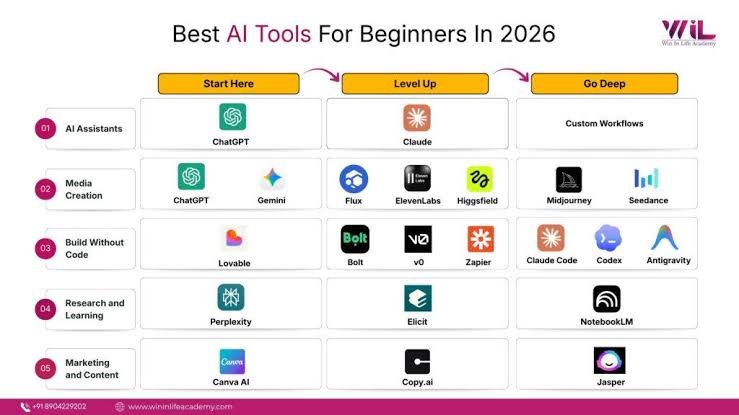
AI tools are transforming work and everyday life by making writing, research, design, coding, and organization more accessible. ChatGPT, Google Gemini, Microsoft Copilot, Claude, Perplexity, Grammarly, Canva, Midjourney, GitHub Copilot, and Notion AI each offer different ways to simplify tasks and support creativity.
For students, these tools can make learning more interactive. For professionals, they can reduce repetitive work and improve productivity. For small businesses, they can provide affordable ways to explore marketing, communication, and automation.
However, AI should be treated as a helpful assistant rather than an unquestionable source of information. Accuracy, privacy, cost, and responsible use should remain important considerations.
The smartest approach is to begin with a clear goal, select a tool that meets that need, and evaluate the results. People should also continue developing their own knowledge and judgment rather than depending entirely on automated systems.
As artificial intelligence continues to evolve, its greatest value will come from helping people do meaningful work more effectively. The future is not simply about using more AI tools. It is about using the right tools in ways that improve productivity, encourage creativity, and make everyday life easier.